
Pynwheel Map: two inputs, five days, one seriously good-looking property map
Pynwheel Map is the interactive property map for apartment websites. It puts a clickable 2D or 3D map of your community right where prospects shop. Prospects filter available units, compare floor plans, check their real monthly cost, schedule a tour and apply — all from the map. It even shows up on your Apartments.com listing. It's $29 a month, and your team's entire to-do list is: submit your PMS credentials and site plan.
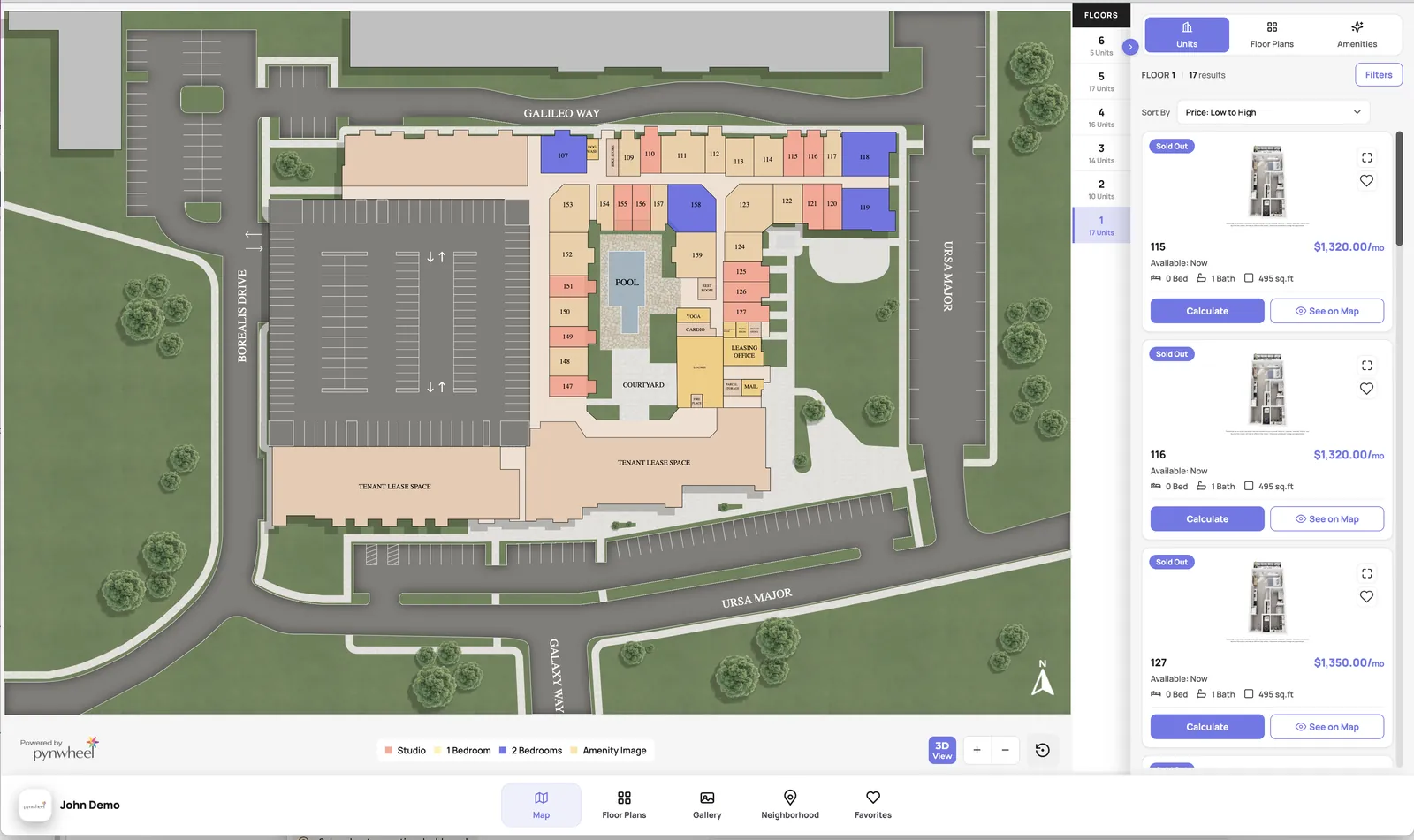
// a real Pynwheel Map: units colored by floor plan, live pricing on the right
// definitions, for humans and robots
What is an interactive property map?
An interactive property map (also called an interactive site map or apartment map) is a clickable map of a multifamily community embedded on its website. Instead of a static site plan, prospects see every building, floor and available unit, and can click any home for pricing, floor plans, photos and next steps.
Pynwheel Map pulls availability and pricing straight from your property management system, so the map stays current without anyone updating it by hand.
With Pynwheel Map, prospects can:
- Filter and explore available units by floor, bedrooms, price and move-in date
- View floor plans, virtual tours, photos and videos
- See their true monthly cost with the built-in rent calculator
- Schedule a tour and start an application
- Save and share favorites with roommates, family and friends
With zero lift from your team, the map moves people from apartment shopping to apartment choosing.
// the new map, feature by feature
2D and 3D property maps that make your community make sense
Next-level visuals, built to load fast on any phone and drop into any website without friction.
2D and 3D map designs
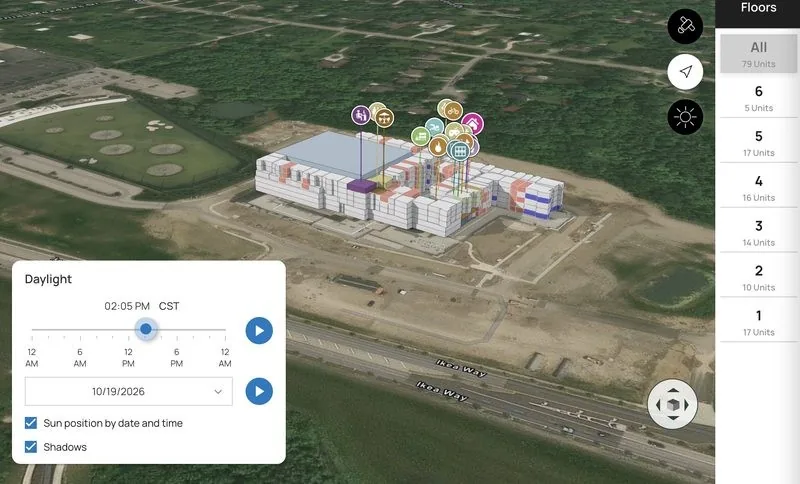
Modern 2D maps and fully dimensional 3D maps with depth and clean styling, shown on a satellite image of the surrounding area. Your community, instantly understandable (and instantly more desirable).
Sunlight exposure tool
Show how daylight falls across the property by date and time. Finally, an answer to "which units get the morning sun?" (We care about the houseplants.)
Floor plan color coding + satellite view
Units are colored by floor plan, and satellite image overlays show the real surroundings.
Rent calculator
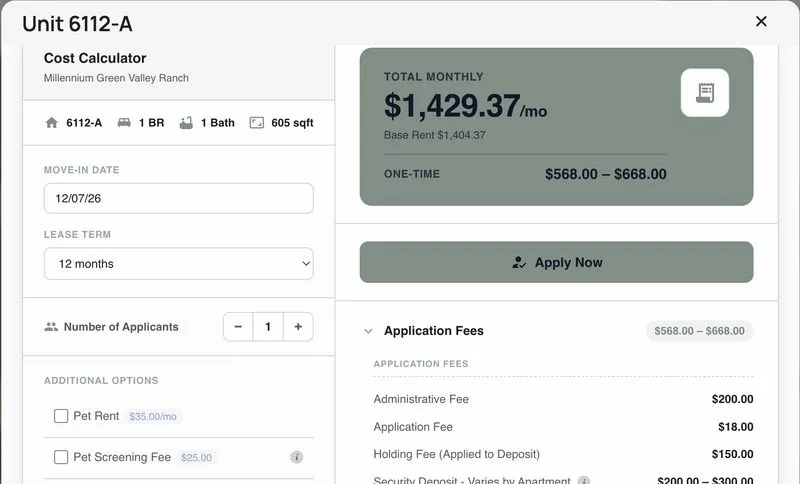
Prospects pick a move-in date, lease term, applicants and add-ons like pets or parking, and see one-time fees and their monthly total instantly. Fee transparency, built in.
Richer unit pop-ups
More images, more unit details and built-in links to the 3D tour, rent calculator, scheduling and applications.
Student housing mode
Search by floor plan, show unit space details and display availability banners when a floor plan is running low or sold out.
// one map, two places to be found
Your map on your Apartments.com listing, too
Pynwheel is an Apartments.com map partner. Once your Pynwheel Map is set up, it's automatically syndicated to your Apartments.com listing, so renters get the same interactive property map wherever they're shopping.
- Existing clients: it’s already on. We switched on the Apartments.com integration for you. Not seeing your map? Email support@pynwheel.com
- New clients: order Pynwheel Map and note that you want it on your Apartments.com listing
- Available on Apartments.com Gold ad packages and above; Apartments.com verifies eligibility within two business days
// 2 inputs | 5 minutes | 5 days to live
How to get an interactive map on your apartment website
No implementation project, no developer, no IT ticket. Here's the whole thing:
- STEP 01
Order online
It takes about five minutes at order.pynwheel.com.
- STEP 02
Submit two things
Your PMS credentials and your property map (site plan). Images and logos? Upload them, or we’ll grab them from your website.
- STEP 03
Go live in 5 days
We build your map, connect it to your PMS and send you the embed for your website.
// pricing, no asterisks
Pynwheel Map pricing
Priced to make the decision easy. Cancel anytime, and you keep the map design. It's yours.
MONTHLY
$29
per month, per property
ONE-TIME SETUP
$995
map design, PMS connection and launch
Built for every kind of community
- Apartments
- Student housing
- Condo buildings
- Built-to-rent
- Multi-building sites
- New home subdivisions
- Commercial buildings
- Lease-ups & new developments
Connects to your PMS
- Entrata
- Yardi RentCafé
- RealPage
- ResMan
- MRI
- AppFolio
Listing syndication: Apartments.com · Partners: Beans.ai · Matterport · Realync · Rentsync · Gryd · LCP360
One map, everywhere you lease
The same Pynwheel Map powers the Pynwheel Touch leasing touchscreen and the Pynwheel Tour self-guided tour app, so prospects see the same community on your website, in your office and on their phone.
// FAQ
Pynwheel Map FAQ
How much does Pynwheel Map cost?
$29 per month plus a one-time $995 setup. You can cancel anytime and keep the map design.
How long does setup take?
Your map goes live 5 days after we receive your PMS credentials and property map.
What does my team need to do?
Submit two things: PMS credentials and your property map. We also use your images and logos; upload them to Pynwheel Launch, our setup portal, or we’ll take them from your website.
Does it require IT or a developer?
No. There's no integration project. Pynwheel connects directly to the PMS you already use, and the map embeds on any website.
Which property management systems does Pynwheel Map integrate with?
Entrata, Yardi RentCafé, RealPage, ResMan, MRI and AppFolio.
What's the difference between a 2D and a 3D property map?
A 2D map is a clean, top-down site plan. A 3D map adds depth and building heights, shown on a satellite image of the area, plus a sunlight tool that shows daylight across the property by date and time.
Does the map show live availability and pricing?
Yes. Availability and pricing come from your PMS, and prospects can use the rent calculator to see one-time fees and their monthly total.
Does it work on phones?
Yes. Pynwheel Map is optimized for speed and mobile performance and works on every device.
Does Pynwheel Map work for student housing?
Yes. Student housing communities can search by floor plan, show unit space details and display availability banners when a floor plan is running low or sold out.
Does Pynwheel Map work with Apartments.com?
Yes. Pynwheel Map is automatically syndicated to your Apartments.com listing (Gold ad packages and above). We’ve already switched it on for existing clients; new clients just mention it when ordering. See Apartments.com’s instructions.
What if I decide not to use it?
No problem. Cancel anytime, and you keep the map design.
How do I order?
Order online at order.pynwheel.com, or contact us with questions.
What if I need help?
Contact Pynwheel Support: real people, available whenever you need anything.
Your map could be live by next week
Five minutes to order. Five days to live. Zero items added to your team's to-do list.